
I Can't Write Code. I Still Built a Photo Gallery for $0.
I can't write code. I still built a photo gallery for $0 using Codex and Cloudflare — just drag files into a folder and the site updates itself.

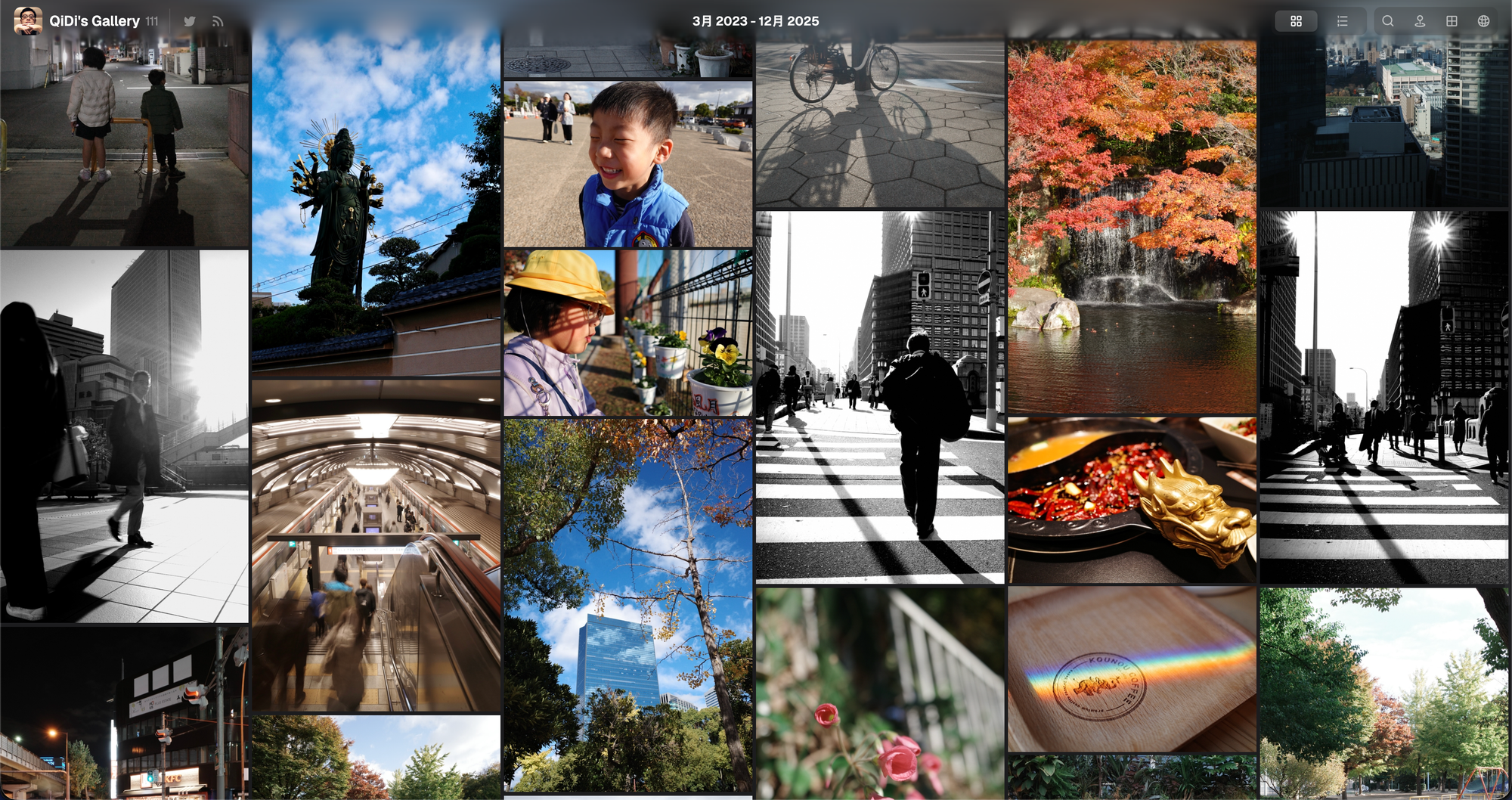
I have tens of thousands of photos on my NAS. When I actually need one, I can't find it.
Some went to Moments. Some to Instagram. The rest sit as RAW files on my NAS. Three places, three separate memories, none of them connected. When I needed a photo for a blog post, I dug through everything and still couldn't find that one shot I knew I had taken.
So I built my own photo gallery.
One day, and gallery.qidi.jp is live~
I Asked Around. The Right Tool Didn't Exist.
I started by asking ChatGPT: is there a lightweight, cheap photo portfolio solution with a custom domain?
It gave me a list: Squarespace, Pixpa, Ghost, plus a few open-source projects on GitHub.
Squarespace and Pixpa are built for pro photographers. Beautiful templates, but subscriptions start at over $10 a month. Way too heavy for what I needed. I just wanted to display photos, not run a photography business. Ghost is a blogging platform you can self-host, but that means managing a server. Too much hassle. GitHub open-source projects? Found a few, but either too bare-bones or required writing code to configure.
Then I found Afilmory. Clean interface, EXIF support, auto-generated thumbnails, folder-based tagging. Basically what I wanted.
But the official SaaS free tier limits photo count, monthly uploads, and file size. And you can't use your own domain. I didn't want to pay a monthly fee just to display photos, or be stuck with someone else's subdomain.
So I self-hosted it — even though I can't write code.
I Let Codex Read the Repo First
I'm not a software engineer. I can't write code from scratch, and reading code isn't easy for me either. But I have a habit: when I run into a technical project, I throw the repo and docs at Codex and let it read through everything, tell me what I need to prepare.
Ten minutes later it came back: you've got Node.js, pnpm, wrangler, and gh CLI already installed. This project uses Cloudflare R2 for photo storage, Cloudflare Pages for hosting, and GitHub Actions for auto-builds. You're basically ready to go.
Meaning: I didn't need to write code. I just needed to make decisions and fill in configs.
Here's the thing.
A lot of people think AI coding tools are for writing code. For someone like me, a non-engineer, the bigger value is having it read docs, map out steps, and check feasibility. I don't need to understand what every line of code does. I just need to know what to do at this step and what button to click next.
The Setup I Ended Up With
After tinkering, the architecture looks like this:
- Codex connects my Cloudflare and GitHub accounts,
- Cloudflare R2 stores photos (cloud storage, first 10 GB free),
- Afilmory Builder scans photos, reads EXIF, and generates thumbnails,
- GitHub Actions auto-triggers a build every 3 hours,
- Cloudflare Pages publishes the site to a global CDN,
- then I point my own domain at it.
In plain English:
- Through Cloudflare's web dashboard, I drag photos into an R2 folder,
- Three hours later I open my domain and the photos are already there.
- Thumbnails, EXIF, camera model, lens info — all auto-generated.
What You Do vs. What Codex Does
The whole setup breaks into two parts.
On my side, I only had to do a few things:
- Register Cloudflare and GitHub accounts (I already had both), then connect them to Codex,
- Create an R2 bucket in Cloudflare,
- Paste the R2 read-only keys into the Pages project settings,
- Point my domain at the Pages project.
Sounds like a lot, but every step is just clicking buttons and filling forms. No coding.
Codex handled the rest:
- Reading repo docs,
- Generating the
builder.config.tsconfig file, - Writing the GitHub Actions scheduled build script,
- Debugging errors.
Once the histogram wouldn't load, and it reminded me to check R2's CORS config. Turned out I hadn't added my domain.
Daily maintenance is even simpler. I do exactly one thing: log into Cloudflare, open R2, drag photos into a folder, close the tab.
Can't wait 3 hours? Click "Run workflow" in GitHub Actions, or ask Codex to run a single command. Instant build.
Cost
I ran the numbers.
R2 is free for the first 10 GB per month. Pages is free. GitHub Actions free tier is plenty. Domain I already owned. For JPG photos, 10 GB holds thousands of images. Even if you exceed it later, R2's overage pricing is tiny.
In practice, this runs at zero cost.
Compare that to Squarespace at $12+/month, or Pixpa at $8+/month. The advantage isn't just saving money. It's not paying for features you don't need.
That's how I built a photo gallery for $0.
The Checklist
When I went live, I checked:
- Original photos visible in R2,
- Pages build log shows photos scanned,
- Domain loads with HTTP 200,
- New photos visible on the site,
- Thumbnails load,
- Full-size images load on click,
- EXIF displays correctly,
- Histogram displays correctly,
- Auto-build schedule running.
All green. Site is live.
After Going Live, I Added a Few More Things
Once the site was running, I wanted a few extras.
A language toggle (Japanese, Chinese, English), a custom favicon, and social share preview cards.
How? Same approach as before. I asked Codex: I want to add a language toggle. What's the simplest way?
It read the code and told me Afilmory's Vue frontend could be modified, and there were a few approaches. I picked the lightest one — static JSON language files, button in the navbar, page refreshes on switch. Then I just had it modify the code, push to GitHub, and trigger a Pages rebuild.
Favicon and share cards worked the same way. I described what I wanted, and it generated the code, configured meta tags, and created OG images. I just checked the preview. If it didn't look right, I told it to adjust.
Post-launch customization follows the same logic as the initial setup. You tell Codex what you want, it tells you which approach is lightest, then it modifies and deploys. You still don't write code. You just need to express yourself clearly — what you want, what you don't want, and then choose the option.
If You Want to Try This
If you're dealing with the same problem — photos scattered across apps and drives, no unified place to showcase them — this setup is worth a shot.
The core idea isn't "learn a bunch of tech."
It's learning to hand off requirements and let AI do as much of the work as possible.
Let Codex read the docs for you. You don't need to understand code, just know what to click next. Use Cloudflare's free tier — R2 plus Pages is more than enough for a mid-size portfolio. Keep maintenance minimal: drag files into a folder, let automation handle the rest.
The real pain of photo management isn't storage. Your NAS already handles that.
The pain is curation: picking out the subset worth showing, putting it in one place, making it searchable and viewable.
Backup is the baseline. Curation is what makes photos valuable.
Where are your photos stored right now? Can you actually find the one you need, when you need it?